Jun 26, 2026News & Insights
5 Professional Tips to Maximize Lifespan of GaN & PD Fast Chargers
Do You Know How to Maximize Lifespan of Chargers and smart phones?Here are 5 professional maintenance guidelines for you
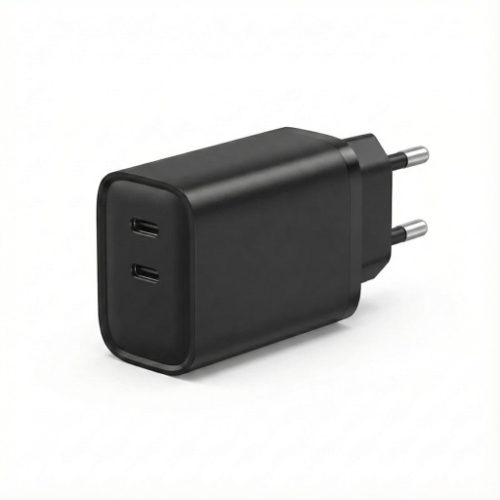
Do You Know How to Maximize Lifespan of Chargers?
Below are 5 maintenance guidelines for you
In the era of high-speed power delivery, GaN (Gallium Nitride) and PD (Power Delivery) chargers have become essential for our tech-driven lives. While these chargers are engineered for efficiency and high performance, improper use can lead to degraded charging speeds or hardware failure.
To ensure your chargers stays safe and efficient, follow these professional maintenance guidelines.
1. Optimize Heat Dissipation for GaN Efficiency
GaN technology allows for incredible power in a tiny form factor, but high-density charging still generates heat.
- The Rule: Always use your charger in a well-ventilated area.
- What to Avoid: Never charge your phone with the charger tucked under a pillow, blanket, or in a cramped socket corner. Excessive heat can trigger the thermal protection circuits, eventually shortening the lifespan of the internal capacitors.
- Important reminding: Please remove the protect film of the new charger when first time using ,the film also prevent heating .
2. Protect the USB-C Port: The PD Performance Core
The USB-C port on a PD charger is a precision interface with multiple tiny pins.
- Cleaning: Dust and pocket lint are the enemies of fast charging. If your charger isn't hitting "Fast Charging" speeds, use a wooden toothpick or an antistatic brush to gently clear the port.
- Avoid Moisture: Never plug in a cable if the charger port or the cable connector is damp. Moisture can cause a short circuit in the high-voltage PD pins, potentially damaging both the charger and your smartphone.
3. Smart Plugging: Wall First, Device Second
To avoid "arcing" (that tiny spark you sometimes see), develop a healthy plugging habit.
- The Sequence: Plug the charger into the wall outlet first, then connect the USB-C cable to your phone. This allows the internal PD controller to stabilize the voltage before it begins the digital "handshake" with your device, ensuring a smooth and safe power flow.
- Important reminding:this is a very important step to maintain the lifespan of smart phones and other devices
4. Cable Management & Strain Relief
A PD charger is only as good as the cable connected to it.
- Don't Bend: High-wattage PD cables are often thicker due to reinforced copper. Avoid sharp bends near the connector (the "neck").
- Storage: When traveling, coil the cable loosely in a circle rather than wrapping it tightly around the charger brick. This prevents internal wire fatigue which can lead to intermittent power delivery.
5. Chemical Safety & Static Control
GaN chargers use advanced composite plastics that can be sensitive to harsh solvents.
- The Safe Way: To clean stains, use a cloth lightly dampened with 75% or 95% Isopropyl Alcohol.
- Avoid Static: Never use a dry, synthetic cloth in a very dry environment, as static discharge can theoretically interfere with the sensitive E-marker chips found in high-speed charging ecosystems.
Summary: Why Proper Care Matters
A well-maintained GaN PD charger doesn't just last longer; it protects your smartphone’s battery health. By maintaining stable current and preventing overheating, you ensure that your device receives the exact wattage it needs without unnecessary stress.